Short answer: install Takt. Duplicate prevention is on by default and free. Open a link that's already open in another tab, and you land on the existing tab instead.
- 5 URL matching strategies decide what counts as "the same page". The default ignores the
#fragment. - Need the duplicate anyway? Right-click the link, or click Open anyway.
- Close Duplicates cleans up the current window in one click.
Why does Chrome open duplicate tabs?
Chrome treats every new tab as a separate request. It never checks whether that page is already open. So the same dashboard, ticket or doc piles up from links in mail, chat and search results.
Each copy is a full page that keeps running. Closing it by hand means finding it first.
What happens when Takt blocks a duplicate?
- You open a link to a page that's already open in another tab.
- Takt closes the new tab.
- It switches you to the existing tab, in whichever window it lives.
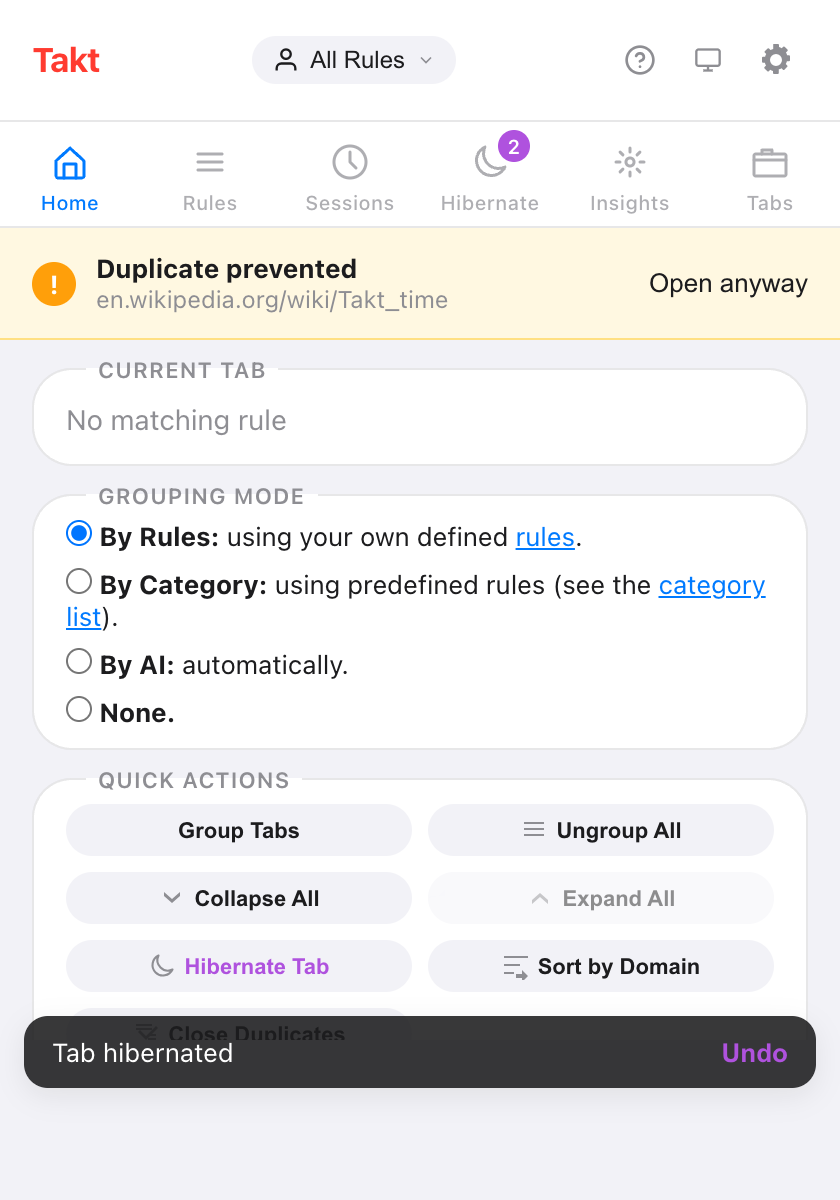
- The popup shows "Duplicate prevented" with an Open anyway button for 10 seconds.
If you've granted Takt's optional "All website access" permission, a notice also appears on the page: "Takt detected a duplicate URL and switched to this tab", with Dismiss and Open anyway.
The check runs in every grouping mode: Rules, Category, AI and None. It only looks at tabs as they open. Navigating an existing tab to a page that's open elsewhere doesn't trigger it.
What counts as the same URL?
First, Takt cleans up every URL the same way. It drops www., removes a trailing slash, and decodes harmless percent-encoding such as %41 to A. So https://www.example.com/docs/ and https://example.com/docs are the same page.
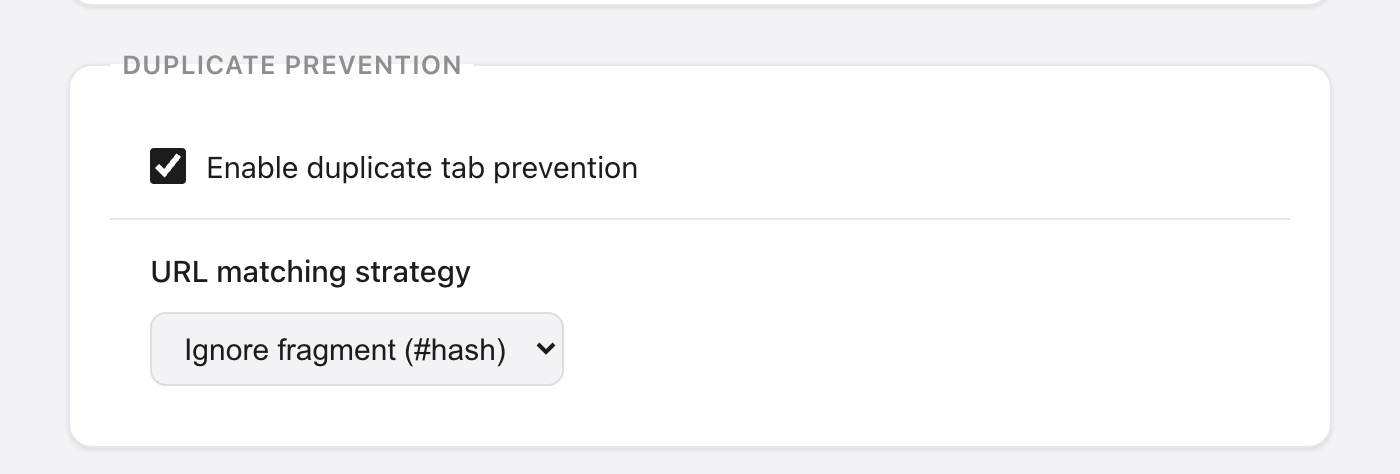
Then your matching strategy decides how strict to be. Pick it in Options → Settings → Duplicate Prevention.
| Strategy | Compares | Treated as the same |
|---|---|---|
| Exact URL | Everything, with query parameters sorted | ?a=1&b=2 and ?b=2&a=1 |
| Ignore fragment (#hash) Default | Everything except the #fragment | /page#top and /page#bottom |
| Ignore query string | Scheme, host and path | /page?ref=mail and /page?ref=chat |
| Ignore query + fragment | Scheme, host and path | Same as above |
| Origin + path only | Scheme, host and path | Same as above |
In the current version, the last three compare URLs the same way. Choose any of them when you want tracking parameters ignored.
Be careful with the loose strategies on search and app pages. /search?q=chairs and /search?q=tables share a path, so ignoring the query treats them as one page.
How do I open a duplicate on purpose?
- Right-click the link and choose Open in new tab (allow duplicate). This works on any page.
- Click Open anyway on the page notice or in the popup, right after a block.
- Shift+click the link, in Rules mode, on pages where Takt has page access.
Or untick Enable duplicate tab prevention in Settings to turn the whole feature off.
How do I close duplicate tabs already open?
Click Close Duplicates on the popup's Home pane. Takt scans the current window with your matching strategy and keeps the first tab of each page, counting from the left. The rest close at once, with no confirmation, and the popup reports how many it closed. The button is greyed out when there's nothing to close.
Can one site use a different strategy?
Yes, in Rules mode. Open a rule, tick Prevent duplicate tabs in this group, and pick a URL matching strategy for that rule's tabs.
Use it for a single-page app where each #fragment is a different view: set that rule to Exact URL and keep the global default for everything else. The global switch stays the master switch. With it off, no tab is blocked, even in a rule with the box ticked.
How does this compare with other options?
| Chrome alone | Single-purpose blocker | Takt | |
|---|---|---|---|
| Blocks duplicates as they open | No | Yes | Yes, on by default |
| Choose what counts as the same page | No | Varies | 5 strategies, per rule too |
| Close existing duplicates | No | Varies | One click, current window |
| Also groups and hibernates tabs | No | No | Yes |
Check that any single-purpose extension is still maintained. Duplicate Tabs Preventor, for example, has been unmaintained since April 2026.
What duplicate prevention doesn't do
- It doesn't merge tabs that were already open before you installed Takt. Use Close Duplicates for those.
- Close Duplicates works on the current window only.
- The in-page notice and Shift+click need the optional page access permission. The popup banner and the right-click option don't.
Click the same link twice. Land on the tab you already had.
Add Takt to Chrome, freeFAQ
Can Chrome prevent duplicate tabs on its own?
No. Chrome has no setting to block duplicate tabs, so you need an extension.
Is Takt's duplicate prevention free?
Yes. Prevention, all five strategies and Close Duplicates are free, with no limit.
How do I open a duplicate tab on purpose?
Right-click the link and choose Open in new tab (allow duplicate), or click Open anyway after a block.
Does it work in every grouping mode?
Yes: Rules, Category, AI and None.