Tabs, sorted .
Auto-group tabs by rule, category, or AI. Prevent duplicates, reclaim memory. All local — no account, no telemetry.
Built by a security engineer who couldn't stop hoarding tabs.
No account needed. Free to start.
See it in action
Watch Takt organize tabs automatically as you browse.
One extension. Every color Chrome gives you.
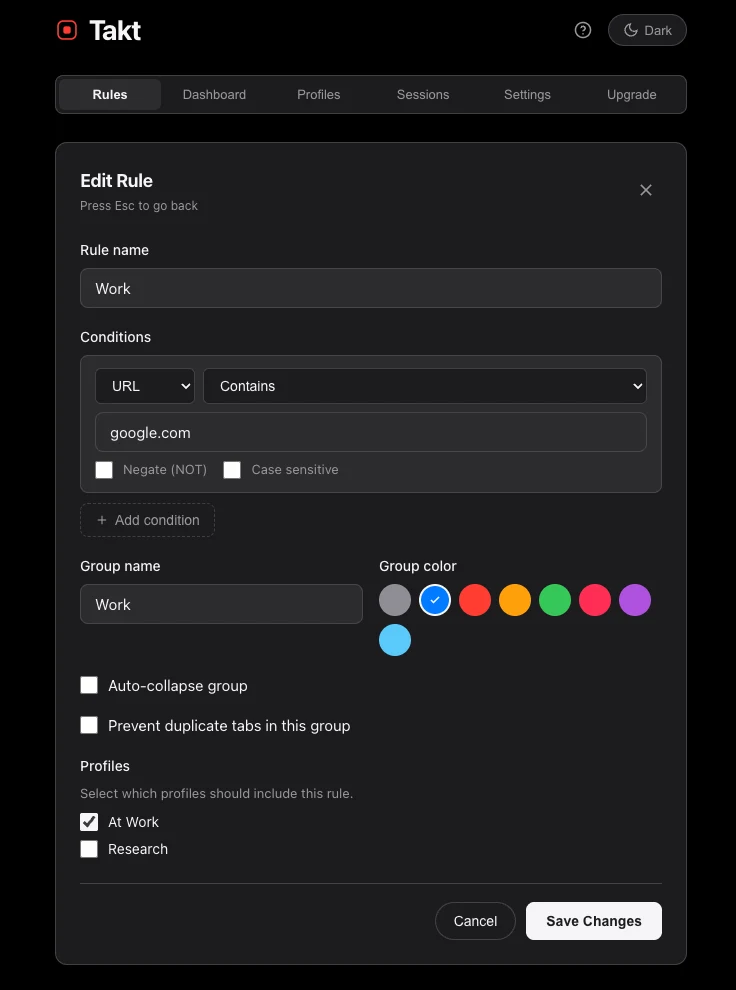
Group by rule. Walk away.
Define URL patterns — contains, domain, glob, or full regex. Takt watches every new tab and files it into the right Chrome group with the right color. Manual or automatic. Free tier includes 5 rules with basic matching. Premium unlocks unlimited rules, all match types, title matching, and compound AND/OR conditions.
How it works →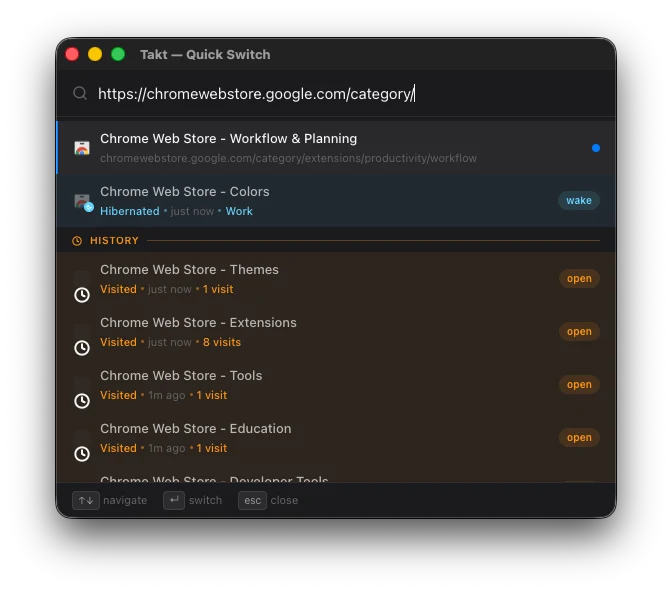
Find any tab. Instantly.
Press Alt+Shift+Space anywhere in Chrome. A fuzzy-search overlay appears — type a few letters and jump without touching your mouse. Searches all open tabs by title and URL. Premium extends results to hibernated tabs and your full browsing history.
How it works →No duplicates. No surprise.
Open the same URL twice and Takt closes the copy, focuses the original, and shows a quiet toast. Five matching strategies handle query strings, fragments, and trailing slashes. Bypass anytime with Shift+click or the context menu.
How it works →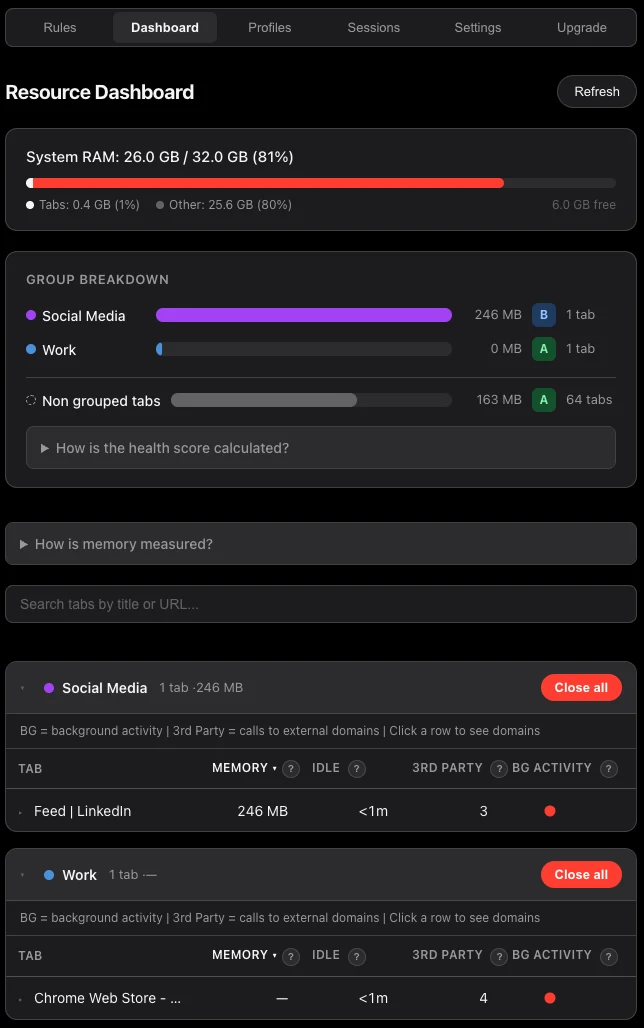
See what your tabs cost.
Per-tab memory measurement. Per-group health scores from A to F. Network request counts. Staleness tracking for tabs you forgot about. Set memory budgets and Takt discards tabs that exceed them. All measured locally — no external services. Premium feature.
How it works →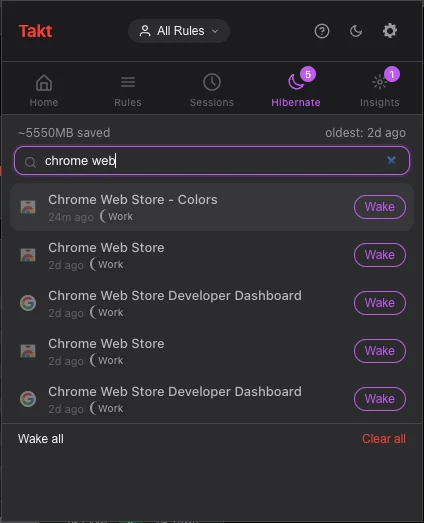
Sleep tabs you don't need.
Takt fully closes idle tabs and saves their state — URL, title, tab group, scroll position. Memory is reclaimed the moment the tab closes. Wake any tab with one click and it returns exactly where you left it. Manual hibernation is always free. Set idle thresholds, memory pressure limits, or a tab ceiling to hibernate automatically — Premium features.
How it works →Everything else.
The details that make the difference.
Profiles for every context
Create named rule sets — Work, Personal, Research. Switch in the popup or schedule auto-switching by time of day. Premium.
How it works →Keyboard-first
Alt+Shift+G to organize. Alt+Shift+U to ungroup. Alt+Shift+C to collapse. No mouse needed.
How it works →Rules you didn't write
Takt watches your unmatched tabs. When a domain cluster appears, it suggests a rule. Accept or dismiss. Free.
How it works →Right-click, done
Right-click any tab and choose "Create rule from this tab." Takt prefills the URL pattern and group name. Premium.
How it works →Portable settings
Export rules, settings, and profiles as a single JSON file. Import on another machine. Premium.
How it works →Save your workspace
Snapshot all your tab groups into a named session. Restore later in a new window or replace the current one. Up to 50 sessions. Premium.
How it works →Sync across devices
Pick a folder watched by your cloud client (Google Drive, Dropbox, iCloud) or connect Google Drive directly for automatic background sync. Premium.
How it works →Act on whole groups
Close, bookmark, or move an entire tab group to a new window in one click. Available from the Options page or right-click menu. Premium.
How it works →Group by Category
One click in the popup organizes ungrouped tabs into up to 20 semantic categories — News, Shopping, Finance, and more. Free tier: up to 5 tab groups in total, counting the ones already open. Premium: unlimited.
How it works →Smart Group with AI
Chrome's on-device Prompt API clusters tabs by meaning. Semantic keyword matching as fallback. No data leaves your browser. Free tier: up to 5 tab groups in total, counting the ones already open. Premium: unlimited.
How it works →How it works.
Install
Add Takt from the Chrome Web Store. No account. No setup wizard. Takes five seconds.
Write a rule
Pick a URL pattern and a group color. Or right-click any tab and let Takt prefill it.
Forget about it
Enable auto-mode. Takt watches every new tab and groups it. You never touch it again.
No testimonials yet. Here is the record instead.
Takt is new. Rather than invent social proof, here is what actually exists: what has shipped, what has been written down, and who is behind it.
Shipped, not promised
Every feature described on this page is in the build you can install right now. Nothing here is a roadmap item.
Read the documentationDocumented, feature by feature
Nineteen features have their own reference page — including the limits and the gotchas, not just the happy path.
Read the blogAnalytics, accounts, trackers
There is no Takt server to send your tabs to. The extension only goes online to check your license and, if you turn it on, to sync with your own Google Drive.
Read the privacy policyWho builds this
Takt is built by a security engineer who could not stop hoarding tabs. That background is why the extension asks for the narrowest permissions it can, keeps every rule and session on your own machine, and ships a privacy policy you can actually read. Local-first is not a positioning choice here — it is the only design that survives its own threat model.
No reviews yet, and none bought. If Takt earns one, leave it here.
Start free. Upgrade when you need more.
Free
- 5 rules
- Contains, exact, domain matching
- All 8 group colors
- Auto-group tabs as you browse
- Auto-collapse groups (current window)
- Manual hibernation (up to 5 tabs)
- Shortcuts: group, ungroup, collapse (Alt+Shift+G/U/C)
- Rule suggestions (top 3)
- Group by Category (up to 5 groups)
- Smart Group with AI (up to 5 groups)
- Duplicate prevention
- Auto-suspend idle tabs
- Search open tabs in the popup
- Rules sync with Chrome Sync
Premium
or $30/year save 17%
- Everything in Free
- Unlimited rules
- All match types (glob, regex)
- Title matching, compound AND/OR
- Unlimited Category and AI groups
- Resource dashboard
- Quick Switch (Alt+Shift+Space) + history search
- Profiles and schedules
- Sessions (save & restore workspaces)
- Automatic hibernation, up to 200 tabs
- File Sync & Drive Sync
- Group actions (close, bookmark, move)
- Context menu rule creation
- Import / export
How Takt compares
Most tab tools save tabs for later or move them into their own workspaces. Takt keeps your tabs open and files each one into a Chrome tab group.
| Takt | Chrome | OneTab | Workona | Ato | |
|---|---|---|---|---|---|
| Groups tabs automatically | |||||
| AI grouping that stays on your computer | Retired | Cloud AI | |||
| Stops duplicate tabs | |||||
| Works without an account | |||||
| Price | Free · Premium $3/month | Free | Free | Free · Pro from ~$7/month | Free · Pro $9.99/month |
Local-first. No accounts. No telemetry.
Your tabs, URLs and rules are never sent to Takt: there is no Takt server. The extension only goes online to check your license and, if you turn it on, to sync with your own Google Drive.
Read the full privacy policy What Takt sends, and what it doesn't →